Spray Blot Photoshop Brushes: A Practical Evaluation for Digital Artists
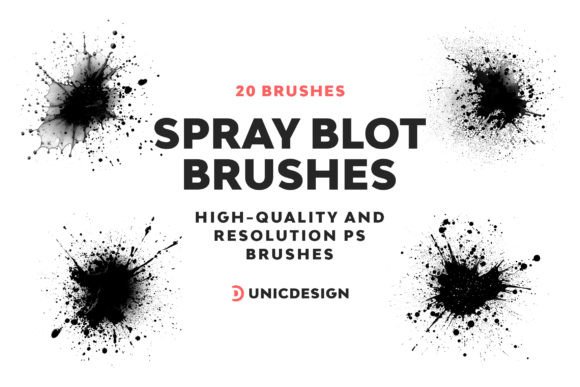
In the landscape of digital illustration and graphic design, the texture of a brush often dictates the mood and realism of a final piece. While default tools in Adobe Photoshop provide a solid foundation, they frequently lack the nuanced irregularity found in traditional media. This is where specialized resources like Spray Blot Photoshop Brushes enter the conversation. Designed to replicate the chaotic yet controlled nature of aerosol paint and ink blots, this specific collection offers 20 high-resolution presets aimed at enhancing artistic expression. For professionals and enthusiasts alike, understanding the technical specifications, workflow integration, and comparative advantages of such tools is essential before integrating them into a production pipeline.
Defining the Spray Blot Aesthetic and Technical Specifications
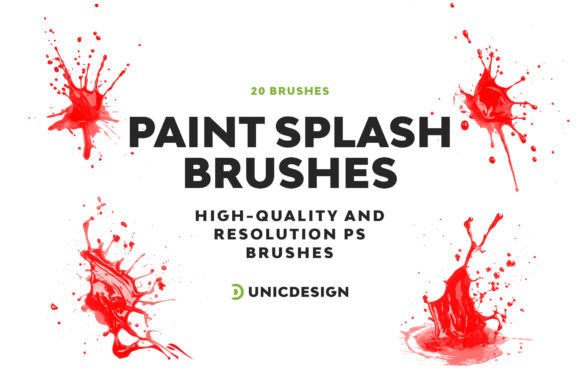
The primary distinction of Spray Blot Photoshop Brushes lies in their ability to simulate organic imperfection. Unlike standard airbrush tools that produce smooth, uniform gradients, spray blot brushes are engineered to create textured edges, random speckling, and fluid accumulation effects. The set comprises 20 distinct variations, each crafted to approximate a resolution of 2000 pixels. This high-definition capability ensures that when an artist scales a stroke up for large-format printing or zooms in for detailed work, the texture remains crisp rather than pixelated or blurry.
From a technical standpoint, the value proposition centers on the balance between complexity and usability. Many high-end brush packs require extensive configuration within the Brush Settings panel to function correctly. In contrast, these brushes are designed with simplicity as a core tenet. They are pre-configured to deliver exceptional spray effects immediately upon selection, reducing the time spent on tweaking scatter, shape dynamics, and dual brush settings. This streamlined approach allows designers to focus on composition and color theory rather than tool mechanics, effectively increasing overall productivity.
Compatibility and System Integration
A critical factor in evaluating any digital asset is its longevity across software updates. Spray Blot Photoshop Brushes have been built with broad compatibility in mind, functioning seamlessly from legacy versions like CS6 through to the most recent CC 2023 editions. This cross-version stability is particularly important for studios that may operate on mixed hardware environments or for freelancers who prefer not to upgrade their software annually. The file format adheres to standard .ABR protocols, ensuring that installation is straightforward without the need for third-party plugins or complex scripts.
Furthermore, the package includes a comprehensive Readme file and access to dedicated support. While many free or low-cost brush sets offer no guidance, the inclusion of documentation helps users troubleshoot common issues, such as brush scaling or opacity adjustments. The promise of 24/7 support provides a safety net for professional workflows where downtime can be costly, distinguishing this resource from generic downloads found on open repositories.
Comparing Spray Blot Brushes with Standard Alternatives
When considering whether to adopt Spray Blot Photoshop Brushes, it is helpful to compare them against the native options available in Photoshop and other popular alternatives. The default "Airbrush" tool in Photoshop is versatile but often lacks the granular texture required for gritty, urban, or grunge-style aesthetics. Achieving a similar look with native tools typically requires layering multiple textures, applying noise filters, and manually masking areas—a process that is time-consuming and difficult to reproduce consistently.
In comparison, the 20-brush set condenses this labor-intensive process into a single click. However, this convenience comes with tradeoffs. Native tools offer infinite adjustability; every parameter can be tweaked in real-time. Pre-made brushes, by definition, lock certain parameters to achieve a specific look. If an artist requires a highly unique, one-of-a-kind texture that deviates significantly from the provided styles, they might find the preset limitations restrictive. In such cases, building a custom brush from scratch or using photo-textures might be more appropriate.
Evaluation Against Other Third-Party Collections
The market is saturated with brush packs ranging from free community shares to expensive premium suites. Free brushes often suffer from inconsistent quality, low resolution, or poor organization. Spray Blot Photoshop Brushes address these pain points by guaranteeing high resolution (approx. 2000 px) and curated variety. Unlike massive bundles containing hundreds of low-quality assets, this focused collection of 20 brushes ensures that each tool serves a distinct purpose, preventing the "choice paralysis" that often plagues artists browsing oversized libraries.
Another category of alternative involves vector-based spray tools found in software like Illustrator. While vectors offer scalability without quality loss, they struggle to mimic the randomness and fluidity of actual spray paint. Raster-based tools like the ones discussed here excel in capturing the stochastic nature of pigment distribution. Therefore, the choice depends heavily on the intended output: if the project requires editable paths and clean lines, vector tools remain superior. If the goal is photorealism, texture, and atmospheric depth, raster spray blot brushes are the logical choice.
Strengths, Tradeoffs, and Decision Factors
To make an informed decision, potential users must weigh the strengths of this specific toolset against their individual workflow requirements. The primary strength is undoubtedly the efficiency gain. By providing ready-to-use, high-fidelity textures, the brushes allow for rapid prototyping and iteration. For concept artists working under tight deadlines, the ability to quickly add grime, rust, or spray-paint accents can elevate a draft to a presentation-ready state in minutes.
However, there are inherent tradeoffs. Reliance on a specific set of brushes can sometimes lead to a homogenized style if overused. Artists should view these tools as part of a broader toolkit rather than a replacement for fundamental drawing skills. Additionally, while the brushes are compatible with modern Photoshop versions, extremely old systems running versions prior to CS6 may encounter minor rendering discrepancies, though this is rare given the age of the software ecosystem.
Best-Fit Situations and Limitations
Spray Blot Photoshop Brushes are ideally suited for several specific use cases:
- Urban and Street Art Illustration: The natural fit for creating murals, graffiti tags, and cityscape overlays where texture is paramount.
- Concept Design and Matte Painting: Useful for adding atmospheric effects, dust, fog, or weathering to architectural visualizations.
- Graphic Design and Typography: Effective for creating distressed text effects, vintage posters, or album covers that require a tactile feel.
- Rapid Prototyping: Allows designers to mock up rough ideas with realistic textures before committing to final rendering.
Conversely, these brushes may not be the right choice for projects requiring clinical precision, such as technical diagrams, UI/UX interface design, or clean corporate branding materials. In scenarios where sharp, geometric lines and flat colors are the priority, the organic chaos of a spray blot effect would likely detract from the message. Furthermore, artists who prefer a completely hand-crafted approach, building every texture from raw photographs, might find the presets too convenient, potentially stifling their desire for total control.
Maximizing Value Through Support and Documentation
Beyond the technical capabilities of the brushes themselves, the ecosystem surrounding the product plays a significant role in its long-term utility. The inclusion of a detailed Readme file is a feature often overlooked but vital for professional adoption. It serves as a quick reference guide for installation, usage tips, and troubleshooting, ensuring that the user can integrate the tools without friction.
The availability of dedicated 24/7 support further elevates the reliability of this resource. In the digital asset world, "buy once, hope it works" is a common risk. Knowing that assistance is just one click away—details conveniently located in the documentation—provides peace of mind. Whether a user encounters a compatibility issue with a specific Photoshop update or needs advice on how to best utilize a particular brush for a complex layer blend mode, having access to expert guidance can save hours of frustration.
Making the Final Call
Ultimately, the decision to incorporate Spray Blot Photoshop Brushes into a creative workflow should be based on a clear assessment of current needs versus existing capabilities. For artists seeking to expand their textural vocabulary with high-quality, reliable, and easy-to-use tools, this collection offers a compelling solution. It bridges the gap between the limitations of default software tools and the steep learning curve of custom brush creation.
While no single tool can replace artistic vision or skill, resources like these serve as powerful accelerators. They allow talent to shine by removing technical barriers, enabling creators to focus on what truly matters: the design itself. Whether you are refining a personal portfolio or delivering commercial projects, understanding the nuances of these brushes ensures that your investment of time and resources yields the highest possible return in terms of creativity and efficiency.