Snowball Photoshop Brushes: A Practical Guide for Winter-Themed Digital Art
Creating convincing winter landscapes in digital art often hinges on the quality of the assets used to render snow. While generic brushes can produce flat, repetitive results, specialized tools like Snowball Photoshop Brushes offer a more nuanced approach to texture and depth. This collection, featuring twenty distinct variations, is designed to streamline the process of adding frosty elements to artwork without sacrificing realism or artistic control. For designers, illustrators, and hobbyists evaluating their toolkit, understanding where these specific brushes fit within the broader landscape of digital resources is essential for making an informed decision.
Defining the Snowball Photoshop Brushes Collection
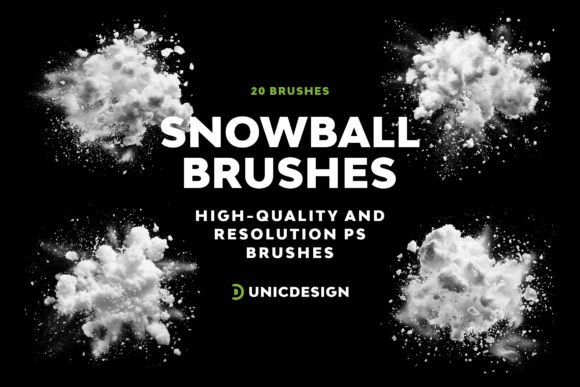
The core value of the Snowball Photoshop Brushes set lies in its precision and resolution. Unlike lower-quality alternatives that may appear pixelated when scaled, each brush in this collection boasts a resolution of up to 2000 pixels. This high-definition capability ensures that even when zoomed in significantly or applied to large canvas sizes, the edges remain crisp and the internal textures retain their integrity. The package includes twenty unique variations, ranging from soft, powdery accumulations to dense, packed snowballs with defined shadows.
A key distinction of this resource is its compatibility. It supports a wide range of Adobe Photoshop versions, extending from CS6 through the latest CC 2022 updates. This broad support window makes it a viable option for professionals working on legacy systems as well as those utilizing the most current software environments. Additionally, the inclusion of a user-friendly Readme file simplifies the installation process, addressing a common friction point for users who may struggle with configuring third-party assets.
Comparing High-Resolution Brushes to Standard Alternatives
When evaluating digital assets, it is helpful to compare specialized sets against standard library options. Most default Photoshop installations include basic round brushes and perhaps a few textured presets. However, these stock tools often lack the complexity required to mimic the chaotic yet organic nature of real snow. Using a standard brush requires significant manual manipulation—layering, masking, and blending—to achieve a result that looks anything but artificial.
In contrast, Snowball Photoshop Brushes are pre-engineered with built-in variation. Each stroke incorporates subtle irregularities in shape and opacity that mimic how light interacts with ice crystals. When compared to free, low-resolution downloads found on various file-sharing sites, the difference is immediately apparent in the final output. Free alternatives often suffer from jagged edges or uniform repetition, which can break the immersion of a piece. The high-grade polish of the Snowball set eliminates the need for extensive post-processing, allowing artists to focus on composition rather than fixing asset limitations.
Texture Versatility and Workflow Efficiency
Beyond resolution, the versatility of the brush shapes plays a critical role in workflow efficiency. A common limitation of single-purpose brushes is the time required to switch between different tools to build a scene. With twenty distinct variations included in the Snowball collection, an artist can handle multiple scenarios—from creating foreground drifts to distant atmospheric haze—without leaving the brush panel. This variety reduces the cognitive load during the creative process, enabling a smoother transition between different stages of the artwork.
Furthermore, the design philosophy behind these brushes prioritizes ease of use. They are crafted to be straightforward, meaning they respond predictably to pressure sensitivity and flow settings. This reliability is a significant trade-off advantage over experimental or overly complex brushes that require constant tweaking of dynamics to function correctly. For professionals managing tight deadlines, the "effortless" application of these tools translates directly into saved hours of rendering time.
Evaluating Tradeoffs and Limitations
While the Snowball Photoshop Brushes offer clear advantages, they are not a universal solution for every type of project. It is important to recognize the contexts in which these specific assets excel and where they might fall short. These brushes are optimized for realistic or semi-realistic depictions of snow. If a project requires a highly stylized, cartoonish, or abstract aesthetic, the high-fidelity detail of these brushes might feel out of place. In such cases, simpler, vector-based shapes or hand-drawn custom brushes could provide a more appropriate stylistic match.
Another consideration is the scope of the collection. While twenty variations provide a robust starting point, complex projects involving massive environmental simulations might eventually require additional assets, such as wind-swept snow streaks or wet slush textures, which are not the primary focus of this specific set. Artists should evaluate whether the included variations cover their specific needs or if they will need to supplement the collection with other resources later.
Additionally, while the brushes are compatible with Photoshop CS6 through CC 2022, users of non-Adobe software (such as Procreate, Clip Studio Paint, or GIMP) cannot utilize them directly. The format is proprietary to the Photoshop ecosystem. For those working outside of Adobe's suite, investing in a Photoshop-specific toolset would not yield immediate results unless converted, a process that can sometimes degrade brush fidelity.
Decision Factors: Is This the Right Tool for You?
Determining whether to integrate Snowball Photoshop Brushes into your workflow depends on several factors, including your current skill level, the nature of your projects, and your existing asset library.
- Professional Output Requirements: If you are delivering work for clients where image quality is paramount, the 2000-pixel resolution of these brushes ensures that your deliverables meet industry standards for print and high-resolution digital displays.
- Time Management: For freelancers or agencies operating under strict deadlines, the ability to apply complex snow effects quickly is a tangible benefit. The reduction in manual texturing time allows for faster turnaround without compromising visual quality.
- Software Compatibility: Ensure your workflow is centered around Adobe Photoshop. If you are using CS6 or any version up to CC 2022, the technical requirements are met seamlessly.
- Support Needs: One often overlooked aspect of purchasing digital assets is the availability of support. The promise of around-the-clock assistance and a direct link to the creators via the Readme file provides a safety net. This is particularly valuable if you encounter installation issues or need guidance on optimizing the brushes for specific layer modes.
Practical Application Scenarios
To visualize the utility of these brushes, consider a few practical scenarios. An illustrator creating a holiday greeting card can use the softer, fluffier variations to create a cozy, inviting atmosphere around characters or typography. Conversely, a concept artist designing a frozen wasteland environment might utilize the denser, more textured brushes to build up rocky terrain covered in heavy ice packs. The ability to mix and match the twenty variations allows for a dynamic range of effects within a single piece.
Moreover, these brushes serve as excellent base layers for further editing. Because they are high-resolution, they can be masked, clipped, and color-adjusted without losing definition. This flexibility means they are not just static stamps but active components of a larger creative process. Whether used for matte painting, character design, or graphic overlays, the Snowball Photoshop Brushes provide a solid foundation upon which detailed winter scenes can be constructed.
Final Considerations for Your Toolkit
Ultimately, the decision to adopt Snowball Photoshop Brushes comes down to balancing quality, efficiency, and cost. For artists seeking to elevate their frosty-themed projects beyond the capabilities of standard tools, this collection offers a compelling combination of high resolution, variety, and ease of use. The commitment to customer satisfaction and the comprehensive compatibility across Photoshop versions further reduce the risk associated with adopting new assets.
However, it remains crucial to assess your specific artistic goals. If your work leans heavily towards abstraction or if you operate primarily outside the Adobe ecosystem, alternative solutions may be more appropriate. By weighing these factors against the strengths of the Snowball set, you can make a strategic choice that enhances your workflow and improves the final quality of your digital art. Whether you are refining a portfolio piece or meeting a client deadline, having reliable, high-grade tools at your disposal is a significant step toward achieving professional results.