Evaluating the 100 Procreate Water Pool Ripples Brush Set for Digital Artists
Digital illustration often hinges on the ability to render complex natural elements with efficiency and realism. Among these, water remains one of the most challenging subjects due to its fluidity, transparency, and the intricate interplay of light and reflection. For artists using the Procreate app on iPad, finding a resource that balances speed with high-fidelity texture is crucial. The 100 Procreate Water Pool Ripples Brush set represents a specific solution designed to address this challenge by offering a comprehensive library of seamless patterns and texture effects. This evaluation explores what makes this brush set distinct, how it compares to other methods of rendering water, and when it serves as the optimal tool for your workflow.
Understanding the Core Functionality of the Brush Set
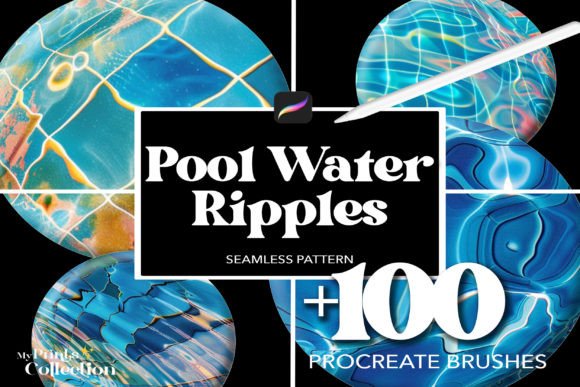
The 100 Procreate Water Pool Ripples Brush is not merely a single stroke tool; it is a curated collection of 100 individual brushes packaged in a standard .brushset file. Each brush within this collection is engineered to simulate the visual characteristics of water surfaces, specifically focusing on pool ripples, caustics, and seamless textures. Unlike standard airbrushes or smudge tools that require significant manual manipulation to achieve a watery effect, these brushes come pre-configured with stamping algorithms and opacity dynamics that mimic the organic irregularity of water movement.
What distinguishes this set is its emphasis on "seamless" application. In digital art, creating a background that tiles without visible edges is often a time-consuming process involving pattern generators or complex masking techniques. These brushes automate that process, allowing an artist to apply a ripple effect that flows naturally across the canvas. Whether the goal is to depict a serene swimming pool, a tranquil pond, or an abstract liquid background, the variety within the 100-brush collection ensures that there is a specific texture weight and frequency suitable for different scales of work.
Comparing Textured Brushes vs. Manual Painting Techniques
When considering resources for water effects, artists generally face a choice between manual painting and utilizing specialized texture brushes. Manual painting involves building up layers of color, using blur tools, and hand-drawing reflections. While this method offers total control over every pixel and allows for unique, non-repetitive results, it is notoriously time-intensive. It requires a deep understanding of fluid dynamics and lighting theory to look convincing.
In contrast, the 100 Procreate Water Pool Ripples Brush offers a trade-off: speed and consistency in exchange for some degree of procedural uniformity. If you are working on a project with tight deadlines, such as social media graphics, book covers, or commercial illustrations where multiple variations of water backgrounds are needed, the brush set provides a significant efficiency boost. It allows you to establish the base complexity of the water surface in seconds, leaving more time to refine lighting and composition manually. However, for hyper-realistic, cinematic work where every ripple must be physically accurate to a specific scene, relying solely on these brushes may result in a slightly repetitive look if not carefully layered and modified.
Assessing Versatility Across Different Artistic Styles
A critical factor in evaluating any digital asset is its adaptability. The 100 Procreate Water Pool Ripples Brush is marketed as versatile, but how does it perform across different genres? For illustrators working in flat design or vector-style art, these brushes can add depth without breaking the clean aesthetic, provided the opacity is adjusted correctly. They function well as subtle overlays that suggest volume rather than defining it with hard edges.
In the realm of tattoo design, which often relies on bold lines and distinct shading, the utility of these brushes lies in their ability to create realistic skin-like textures or water motifs that flow around anatomical structures. The seamless nature of the patterns ensures that designs can wrap around limbs without awkward interruptions. Conversely, for artists specializing in photorealism, the brushes serve best as a starting point. They provide the "noise" and "caustic" patterns necessary for realism, but they should be combined with custom lighting layers and blending modes to avoid the "stamped" appearance that can sometimes plague texture-heavy workflows.
Integration with Other Digital Tools
One advantage of the 100 Procreate Water Pool Ripples Brush format is its compatibility. Since it comes as a native .brushset file, importation into Procreate is immediate, requiring no third-party plugins or complex setup. This contrasts with some alternative resources that might require downloading external image files and importing them as stamps, a process that clutters the gallery and slows down the creative flow. The instant download and unlimited use policy further streamline the workflow, making it a practical choice for professionals who need reliable assets available at a moment's notice.
Identifying Limitations and Decision Factors
While the brush set offers significant benefits, it is important to recognize its limitations to make an informed decision. The primary constraint is the inherent repetitiveness of texture-based tools. Even with 100 variations, using the same brush repeatedly in a large area can lead to visible patterns that the human eye detects as artificial. To mitigate this, skilled users will layer multiple brushes from the set, rotate the canvas, and adjust the size and spacing settings dynamically.
Another consideration is the learning curve associated with maximizing the potential of these brushes. Simply tapping the screen will produce a generic ripple effect. Achieving a truly lifelike result requires knowledge of how to manipulate the brush settings within Procreate—specifically the flow, opacity, and wet mix settings—to blend the ripples seamlessly into the surrounding environment. Beginners might find the initial output too stark or overwhelming without prior experience in texturing.
Furthermore, while the brushes are excellent for simulating still or gently moving water, they may not be the ideal choice for depicting violent waves, crashing surf, or splashing droplets, which often require dynamic stroke-based brushes rather than seamless texture stamps. If your project focuses heavily on kinetic energy and chaotic motion, a different category of brushes designed for fluid simulation might be more appropriate.
Best-Use Scenarios for the 100 Procreate Water Pool Ripples Brush
The 100 Procreate Water Pool Ripples Brush is most effective in scenarios where texture and atmosphere are prioritized over frame-by-frame animation or extreme physical accuracy. It is an ideal choice for:
- Background Creation: Quickly generating atmospheric backdrops for character portraits or landscape scenes where the water is secondary to the main subject.
- Pattern Design: Creating textile prints, wallpaper, or wrapping paper designs that require seamless tiling of water motifs.
- Tattoo Concepts: Drafting designs that incorporate flowing water elements, ensuring the texture looks organic when scaled to body dimensions.
- Concept Art: Rapidly blocking out environments to test lighting and mood before committing to detailed rendering.
On the other hand, if you are creating a technical diagram of hydrodynamics, a scientific visualization, or a piece of art that demands absolute uniqueness in every pixel without any procedural generation, manual painting or 3D simulation software would be the superior alternatives.
Conclusion: Weighing Value Against Workflow Needs
Ultimately, the decision to adopt the 100 Procreate Water Pool Ripples Brush depends on your specific artistic goals and workflow constraints. For artists seeking to enhance their digital creations with the soothing realism of water pool ripples without sacrificing hours to manual detailing, this set offers a robust solution. Its diverse collection, ease of use, and seamless capabilities make it a valuable addition to a professional toolkit. However, like any specialized tool, it functions best when understood as part of a broader strategy that includes manual refinement and creative layering. By balancing the efficiency of these pre-made textures with traditional painting techniques, artists can achieve results that are both visually compelling and technically sound.