Procreate Stained Glass Stamp Brush: A Workflow Guide for Digital Artists
The digital illustration landscape is constantly evolving, offering creators a vast array of tools to streamline their artistic process. Among these resources, the Procreate Stained Glass Stamp Brush has emerged as a vital asset for artists seeking to add intricate detail and texture without the time investment of manual rendering. This tool is not merely a decorative element; it represents a shift in how professionals approach pattern creation, background design, and complex line art within the Procreate ecosystem. For freelancers, small business owners, and hobbyists alike, understanding how to integrate this specific brush set into a broader creative workflow can significantly enhance productivity and output quality.
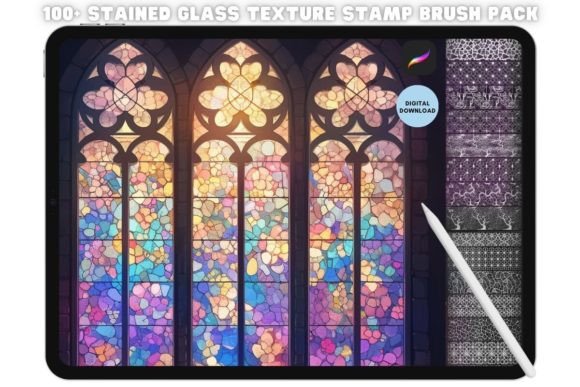
At its core, the Procreate Stained Glass Stamp Brush functions as a pre-rendered stamp that mimics the aesthetic of traditional stained glass windows. Unlike standard brushes that require continuous strokes to build up an image, stamps allow for the instant placement of complex geometric or organic shapes. When paired with a comprehensive collection like the 100 Procreate Seamless Stained Glass texture Stamp Brush Set, the possibilities expand from single accents to full-scale pattern generation. This efficiency is particularly valuable in commercial workflows where deadlines are tight, and consistency across multiple assets is required.
Understanding the Asset and Its Role in Design
Before diving into installation and usage, it is essential to understand what this digital asset brings to the table. The Procreate Stained Glass Stamp Brush is designed to replicate the lead lines, vibrant color blocks, and light refraction characteristics of physical stained glass. Each stamp within the set is unique and meticulously crafted to provide detailed line art that would otherwise take hours to draw by hand. This level of detail is crucial for creating high-quality illustrations, book covers, textile patterns, and marketing materials that demand visual richness.
In a professional context, these brushes serve as foundational elements rather than just finishing touches. They can be used during the initial sketching phase to block out composition ideas, during the coloring phase to define boundaries, or in the final stages to add texture and depth. The seamless nature of many textures in the 100-piece set allows designers to create repeating backgrounds that scale infinitely, a feature that is indispensable for web design, fabric printing, and packaging projects. By leveraging these pre-made assets, creators can focus more on composition and color theory while letting the brush handle the repetitive labor of drawing complex tessellations.
Installation and Setup: Getting Started Quickly
One of the primary advantages of digital assets is their immediate availability. Upon purchasing the Procreate Stained Glass Stamp Brush set, you will receive an instant download link. There are no physical items shipped, ensuring that your workflow is not interrupted by shipping delays. The process of getting these brushes into your iPad is straightforward but requires attention to detail to ensure compatibility.
To install the files, follow this practical sequence:
- Access the Download Link: Open the provided link directly on your iPad using Safari or another compatible browser. Ensure you have a stable internet connection to prevent file corruption during the transfer.
- Locate the File: Once the download completes, navigate to your Files app or the Downloads folder where the
.brushsetfile is stored. - Open with Procreate: Tap on the downloaded file. A prompt will appear asking which app to use. Select "OPEN WITH" and choose Procreate from the list.
- Automatic Loading: Procreate will automatically import the brush set. You do not need to manually drag and drop individual files. The entire library will load instantly into your brush drawer.
This streamlined installation process minimizes friction, allowing you to move from purchase to production in minutes. It is important to verify that your Procreate app is updated to the latest version to ensure full compatibility with all features of the stamp set, including alpha lock interactions and blending modes.
Integrating Stamps into Your Creative Workflow
Once installed, the Procreate Stained Glass Stamp Brush becomes part of your toolkit for various stages of a project. The key to effective integration lies in treating these stamps as modular components rather than static images. Here is how they fit into different phases of the creative process.
Pre-Production and Planning
Before opening a new canvas, consider the scope of your project. If you are designing a pattern for a textile client, the seamless capabilities of the 100-piece set are ideal. You can test different combinations of stamps on a small canvas to establish a mood board or a style guide. This planning phase helps in maintaining consistency across a series of illustrations. By selecting a cohesive subset of stamps early on, you ensure that the final product feels unified rather than chaotic.
Execution and Drafting
During the actual creation of artwork, the Procreate Stained Glass Stamp Brush accelerates the drafting process. Instead of painstakingly drawing every pane of glass or every lead line, you can place a stamp and then manipulate it. Procreate's transformation tools allow you to rotate, scale, and warp the stamp to fit your composition perfectly. You can also adjust the opacity and flow to create variations in light intensity, simulating the way light passes through real glass.
For illustrators working on character design or environmental art, these stamps can be used to create windows, mosaics, or decorative borders. The ability to layer stamps over one another creates depth and complexity. For instance, placing a darker stamp over a lighter one can simulate shadow and dimension, adding realism to flat vector-style illustrations.
Post-Processing and Refinement
After the main elements are placed, the stamps can be refined to blend seamlessly with the rest of the artwork. Use Procreate's selection tools to isolate specific parts of a stamp if you only need a fragment of the design. Adjusting the blend mode to "Multiply" or "Overlay" can help the stamp interact naturally with underlying colors. This stage is critical for quality control, ensuring that the digital asset does not look pasted on but rather integrated into the scene.
Workflow Optimization and Best Practices
To maximize the utility of the 100 Procreate Seamless Stained Glass texture Stamp Brush Set, consider adopting specific organizational habits. As your library grows, keeping brushes organized is essential for efficiency. Create custom folders within Procreate to group similar textures or themes. This reduces the time spent searching for the right stamp during a creative session.
Furthermore, experiment with combining these stamps with other Procreate features. Using the "QuickShape" tool alongside the stamps can help align geometric elements precisely. For those collaborating with a team, exporting the stamp designs as PNGs with transparent backgrounds allows others to use them in different software environments like Adobe Illustrator or Photoshop, facilitating cross-platform workflows.
Consistency is another factor to consider. When creating a series of assets, such as a blog header set or a social media campaign, using the same stamp set ensures visual continuity. This is particularly important for brands and entrepreneurs who rely on a distinct visual identity. The Procreate Stained Glass Stamp Brush provides a reliable source of texture that can be replicated across various media formats.
Long-Term Value and Usability
The value of the Procreate Stained Glass Stamp Brush extends beyond a single project. These assets are reusable and scalable, making them a cost-effective investment for long-term use. Whether you are an educator teaching digital art techniques, a freelancer managing multiple clients, or a hobbyist exploring new styles, having a robust library of high-quality stamps saves countless hours of manual labor.
Moreover, the versatility of the set encourages experimentation. Artists often find new uses for existing tools as their skills develop. What starts as a simple background texture might evolve into a central motif in a larger narrative piece. The detailed line art inherent in each stamp supports both minimalist and maximalist design approaches, adapting to the needs of the user.
In conclusion, the Procreate Stained Glass Stamp Brush and the accompanying 100-piece texture set are powerful additions to any digital artist's arsenal. By understanding the installation process, integrating the tools into a structured workflow, and applying best practices for organization and refinement, users can unlock significant gains in efficiency and creativity. This resource transforms the daunting task of creating complex patterns into a manageable, enjoyable process, empowering creators to bring their visions to life with speed and precision.