Dust Photoshop Brushes for Realistic Effects
There is a specific texture that separates a flat digital image from one that feels tangible and alive. It is often the subtle interplay of light and shadow, or the presence of atmospheric elements like fog, smoke, and yes, dust. For designers, photographers, and digital artists, capturing this gritty realism can be time-consuming if done manually. This is where Dust Photoshop Brushes become an indispensable asset in your creative toolkit. With a curated pack of 20 masterfully crafted variants, you gain immediate access to high-fidelity textures that breathe life into static compositions without hours of manual painting.
The Power of High-Resolution Texture
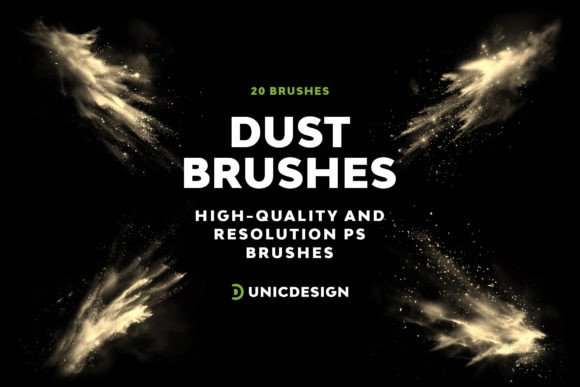
When evaluating digital assets, resolution is non-negotiable. Low-quality brushes often pixelate when scaled up, ruining the illusion of depth. The Dust Photoshop Brushes pack addresses this directly by offering stunning resolutions of 2000 px for every single brush. This ultra-high clarity ensures that whether you are working on a small social media graphic or a massive billboard design, the dust particles remain crisp and defined. The variety within the set allows for nuanced control; you aren't limited to a single "dusty" look but have 20 distinct variants ranging from fine, floating motes to heavy, swirling clouds of debris.
This level of detail supports the principle of artistic freedom. Instead of searching through endless stock libraries for the perfect overlay, you have a dedicated library at your fingertips. The simplicity of navigation means you spend less time managing files and more time creating. Each brush is designed to integrate seamlessly into your workflow, lifting your designs to new echelons of creativity with just a few clicks.
Why Resolution Matters in Digital Texturing
In professional environments, the difference between a 500 px brush and a 2000 px brush is visible upon close inspection. High-resolution brushes allow for complex layering techniques. You can blend multiple dust layers at different opacities to create volumetric lighting effects that mimic real-world physics. This capability is crucial for genres like fantasy art, sci-fi concept design, and cinematic photography retouching, where atmosphere dictates the mood.
Practical Applications Across Industries
The utility of these tools extends far beyond hobbyist experimentation. Professionals across various sectors leverage these textures to enhance communication and engagement. Here is how different creatives apply these resources:
- Photographers and Retouchers: Adding a subtle layer of dust can age a portrait or a product shot, giving it a vintage or film-like quality. It adds character to otherwise sterile digital images.
- Game Designers and Concept Artists: Creating immersive environments requires atmospheric depth. These brushes help simulate dusty corridors, abandoned ruins, or battlefields, grounding the viewer in the scene.
- Marketers and Advertisers: For campaigns targeting a rugged or authentic aesthetic, such as automotive or outdoor gear, realistic dust effects convey durability and use-wear effectively.
- Book Cover Designers: Fantasy and mystery genres often rely on moody atmospheres. A well-placed dust effect can make a cover stand out on a crowded digital shelf.
For educators and bloggers, these brushes serve as excellent teaching tools to demonstrate advanced blending modes and masking techniques. They simplify complex visual concepts, allowing students to focus on composition rather than the tedious task of generating noise manually.
Seamless Integration and Compatibility
A common friction point in creative workflows is software compatibility. Assets that work on newer versions but crash older ones can disrupt production schedules. Fortunately, this collection is engineered for broad compatibility. These Dust Photoshop Brushes merge seamlessly with Adobe Photoshop CS6 and all subsequent versions, including the entire Creative Cloud series (CC 2015.5, CC 2017, CC 2018, CC 2019, CC 2020, CC 2021, and CC 2022).
This wide range of support ensures that freelancers working on legacy systems and agencies running the latest updates can both utilize the same high-quality assets. Installation is straightforward, typically involving a simple drag-and-drop or load process within the Photoshop interface. The inclusion of a comprehensive Readme file further simplifies the user experience, providing immediate solutions to potential inquiries and ensuring you get started without unnecessary delays.
Evaluating Quality Before Implementation
When selecting digital assets, it is vital to look beyond the thumbnail. Check the resolution, the variety of shapes included, and the documentation provided. A robust package should offer clear instructions and consistent quality across all variants. The 20-brush count in this set strikes a balance between variety and manageability, preventing choice paralysis while offering enough options for diverse projects.
Enhancing Productivity and User Experience
Efficiency is the currency of the modern creative professional. Manual texturing is slow; using pre-made, high-quality brushes accelerates the iteration process. By integrating these Dust Photoshop Brushes into your standard workflow, you reduce the time spent on repetitive tasks. This efficiency translates directly to productivity, allowing you to take on more projects or refine existing ones with greater attention to detail.
Furthermore, the user experience is bolstered by the support structure behind the product. UnicDesign ensures that assistance is never out of reach. Should you encounter any issues during installation or usage, their dedicated support team is available 24/7. This commitment to customer service provides peace of mind, knowing that technical hurdles will not stall your creative momentum. The Readme file acts as the first line of defense, addressing common questions instantly, while the support team handles more complex scenarios.
Strategic Recommendations for Use
To maximize the impact of these brushes, consider the following practical tips:
- Use Layer Masks: Never paint directly on your main image layer. Use masks to control exactly where the dust appears, allowing for non-destructive editing.
- Experiment with Blending Modes: Try setting the brush layer to "Overlay," "Soft Light," or "Screen" to see how the dust interacts with the underlying colors.
- Adjust Opacity: Realism often lies in subtlety. Lowering the opacity can create a faint, atmospheric haze rather than a thick cloud of dirt.
- Combine Variants: Don't rely on a single brush. Layer two or three different dust variants to create complex, multi-layered textures that feel organic.
By adopting these strategies, you transform simple digital strokes into compelling visual narratives. Whether you are a business owner looking to elevate your brand's visual identity or a hobbyist exploring new techniques, the right tools make all the difference. These Dust Photoshop Brushes offer a reliable, high-quality solution that bridges the gap between imagination and execution, ensuring your final output resonates with authenticity and professional polish.