Crayon Photoshop Brushes for Authentic Art
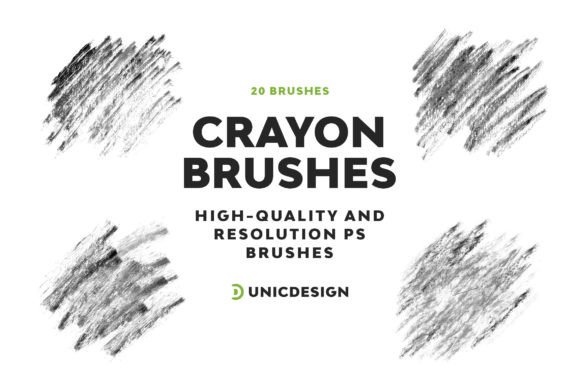
In a digital landscape often dominated by sleek vectors and pixel-perfect precision, there is a distinct hunger for the imperfect. The Crayon Photoshop Brushes collection taps directly into this desire, offering designers and creators a way to inject genuine texture and human warmth into their work. This isn't just about mimicking a child's drawing; it is about leveraging the raw, tactile quality of wax crayons to create sophisticated visual narratives that resonate on an emotional level. With 20 high-resolution variations, each boasting a generous resolution of approximately 2000 px, this toolkit provides the robust foundation needed for professional-grade illustrations without sacrificing that hand-drawn charm.
The Visual Personality of Crayon Textures
What sets these brushes apart is their ability to replicate the physical behavior of wax on paper. Unlike standard soft airbrushes or rigid ink strokes, the Crayon Photoshop Brushes simulate the friction, the grainy buildup, and the occasional skip in coverage that occurs when dragging a wax stick across a textured surface. This creates a unique visual personality characterized by organic edges, subtle color layering, and a sense of depth that flat digital fills simply cannot achieve.
When you apply these brushes, you are essentially introducing a controlled form of chaos. The strokes carry a weight and presence that feels immediate and honest. For a designer looking to break away from the sterile look of modern corporate aesthetics, these textures offer a breath of fresh air. They bring a nostalgic yet contemporary feel, bridging the gap between traditional craft and digital efficiency. Whether you are sketching a rough concept or finalizing a detailed illustration, the variety within the set allows for everything from light, airy shading to bold, saturated lines that pop off the screen.
Strategic Applications Across Design Disciplines
The versatility of this collection makes it a valuable asset across a wide spectrum of creative industries. In brand identity work, incorporating crayon textures can signal approachability, creativity, and authenticity. It works exceptionally well for brands targeting families, educational institutions, or lifestyle products where a "handmade" ethos is central to the message. A logo design utilizing these strokes can instantly communicate a brand that values human connection over cold automation.
For editorial design and publishing, these brushes are perfect for creating engaging headers, pull quotes, or decorative elements that guide the reader's eye without overwhelming the text. When paired with a clean sans serif font or a classic serif font, the contrast between the structured typography and the loose, organic brushwork creates a compelling visual hierarchy. This combination is frequently seen in high-end magazines and blog layouts aiming to establish a distinct voice.
In the realm of packaging design, the crayon aesthetic suggests natural ingredients, artisanal quality, and small-batch production. It helps a product stand out on a shelf crowded with glossy, mass-produced items. Similarly, for web design and social media graphics, these assets allow content creators to produce eye-catching visuals that stop the scroll. The inherent imperfection of the stroke invites viewers to linger, fostering a deeper engagement than polished, stock imagery often achieves.
Enhancing Readability and Brand Perception
While these brushes are primarily used for artistic expression, they play a crucial role in how a project is perceived. The use of a creative font style or handwritten element alongside crayon textures can significantly influence audience engagement. However, balance is key. Using too much texture can compromise readability, especially in body copy. The strategy here is to use the Crayon Photoshop Brushes as accent elements—defining boundaries, highlighting key data points, or framing important messages.
This approach ensures that the brand perception remains one of professionalism mixed with creativity. It tells the audience that the creator cares enough to add a personal touch while maintaining the structural integrity required for clear communication. By integrating these design assets thoughtfully, you avoid the trap of looking amateurish and instead project an image of intentional, curated artistry.
Practical Implementation and Workflow Integration
Getting started with the Crayon Photoshop Brushes is straightforward, designed to fit seamlessly into your existing workflow. The collection includes a comprehensive Readme file that guides you through installation, ensuring you can navigate the setup without any technical glitches. Once installed, you will find that the brushes integrate smoothly with a vast array of Photoshop versions. From the legacy stability of CS6 to the cutting-edge features of CC 2023 and beyond, compatibility is guaranteed across CC 2015.5, CC 2017, CC 2018, CC 2019, CC 2020, and CC 2021.
When evaluating whether this tool fits your specific project, consider the mood you wish to convey. If your goal is ultra-modern minimalism, a crisp vector might be more appropriate. However, if you need to evoke warmth, nostalgia, or a sense of playfulness, these brushes are the ideal choice. Testing different pressure sensitivities and opacity settings can yield surprising results, allowing you to customize the texture to match your specific vision.
For those concerned about commercial viability, this set functions as a premium resource for professional output. It is suitable for both personal projects and commercial commissions, provided you adhere to the licensing terms outlined in the documentation. The 24/7 unlimited support available ensures that if you encounter any hurdles or have questions about usage rights, assistance is always on standby. This level of backing gives peace of mind to entrepreneurs and small business owners who rely on their design tools to generate revenue.
Pairing and Styling Recommendations
To maximize the impact of these brushes, thoughtful font pairing is essential. A strong recommendation is to pair the chaotic energy of the crayon strokes with a highly legible, geometric display font or a neutral modern typography face. This contrast creates a dynamic tension that keeps the viewer interested. For example, use the crayon brushes to underline a headline written in a bold sans-serif typeface, or use them to create a background wash behind a block of text.
Experimentation is encouraged. Try varying the size of the brush to see how the texture scales. At larger sizes, the grain becomes a dominant feature, perfect for backgrounds or large illustrative elements. At smaller sizes, it acts as a delicate highlighter or sketch line. Remember that the goal is not to replace your entire design process but to enrich it with these versatile, high-quality tools. By incorporating the Crayon Photoshop Brushes into your toolkit, you open up a world of possibilities to create dazzling drawings and incredible sketches that truly connect with your audience.