Affinity Photo Designer Stipple Brush Set
Adding texture to digital artwork often feels like chasing a ghost. You want that organic, hand-drawn quality where ink bleeds slightly or dots cluster naturally, but standard software tools can feel too rigid. This is where the Affinity Photo Designer Stipple Brush comes into play. It bridges the gap between sterile vector lines and the chaotic beauty of traditional media. Whether you are illustrating a children's book, creating marketing graphics for a small business, or just sketching ideas on your tablet, this brush set offers a practical solution to bring life and depth to your pixels.
Understanding the Power of Stippling in Digital Art
Stippling is an ancient technique where artists create shading and texture using small, distinct dots. In a digital environment, replicating this effect manually is time-consuming. The Affinity Photo Designer Stipple Brush automates this process while retaining the unpredictability of human hands. Instead of drawing perfect circles, these brushes simulate the way ink hits paper, varying in size, opacity, and density based on your stroke pressure and speed.
The value of this tool lies in its versatility. It isn't just about making dots; it is about controlling light and shadow without relying on gradients. For educators teaching art history or design principles, these brushes provide a visual aid to explain tonal values. For freelancers and entrepreneurs, they offer a unique stylistic edge that separates their work from generic clip art. By mastering this set, you gain the ability to render complex textures—from rough stone to soft fur—with just a few strokes.
The Six Essential Brushes Included
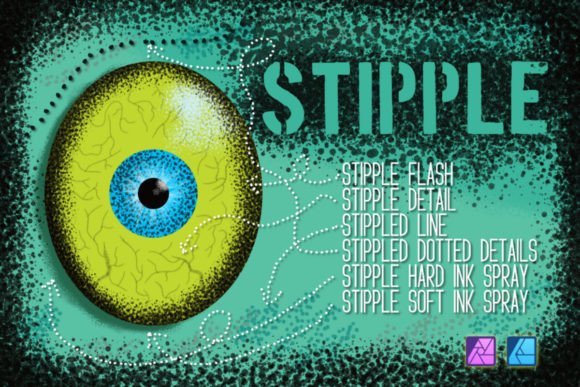
This specific collection is curated to cover a wide range of artistic needs. You will receive a complete set of six distinct brushes, each designed for a specific purpose within your workflow:
- Stipple Flash: Ideal for quick highlights or adding a subtle sparkle to a composition without overwhelming the details.
- Stipple Detail: Perfect for fine work, such as intricate patterns or defining edges with precision.
- Stippled Line: A hybrid tool that combines linear flow with dot texture, great for outlining or structural elements.
- Stippled Dotted Details: Offers a more controlled dot pattern for decorative elements or technical illustrations.
- Stipple Hard Ink Spray: Simulates a forceful application of ink, creating sharp, high-contrast clusters for dramatic shadows.
- Stipple Soft Ink Spray: Provides a gentler, airbrushed effect, allowing for smooth transitions and softer shading.
Having this variety ensures that you don't need to search for different assets for every project. One set handles everything from the broadest washes to the tiniest specks.
Installation Made Simple for PC and iPad
One of the biggest hurdles with third-party assets is getting them to work correctly. Fortunately, the file format for this set is AffBrushes, which integrates seamlessly with Affinity software. The installation process is designed to be intuitive for both beginners and power users.
If you are working on a desktop computer, simply open the downloaded file directly within Affinity Photo. The software recognizes the format immediately and installs the brushes automatically. Once installed, you can access them instantly through the brush library. To ensure these tools are available across your entire suite, navigate to the "Link" brush category. This feature synchronizes your custom brushes so they appear in Affinity Designer and other compatible applications without needing separate installations.
For iPad users, the process is equally straightforward. The included guide walks you through importing the file via the Files app or directly within the application. Since the guide covers both platforms, you won't get stuck wondering why a brush isn't showing up on your tablet. Remember, if you are using Affinity Designer specifically, make sure to switch to Pixel Persona. These brushes are raster-based and function best in the pixel environment rather than the vector workspace.
Practical Applications for Creators and Professionals
How does this translate to real-world projects? Consider a blogger looking to create custom headers for their website. Using the Stippled Line or Stipple Detail brushes, they can create unique borders that look hand-crafted, adding personality to their brand. A small business owner designing packaging might use the Stipple Hard Ink Spray to give a vintage, rustic feel to product labels, evoking a sense of tradition and quality.
In an educational setting, teachers can use these brushes to demonstrate how density affects perception. Students can learn that placing dots closer together creates darker areas, while spacing them out creates lighter tones. This hands-on approach makes learning about shading much more engaging than theoretical explanations.
Freelance illustrators also benefit significantly. When deadlines are tight, having a reliable stipple set saves hours of manual dot placement. You can rapidly build up textures for backgrounds or characters, allowing you to focus more on composition and storytelling. The Stipple Soft Ink Spray is particularly useful for atmospheric effects, such as fog, dust, or magical glows, adding a layer of mood that flat colors cannot achieve.
Key Considerations Before You Start
While the Affinity Photo Designer Stipple Brush is powerful, there are a few things to keep in mind to get the best results. First, understand that these brushes rely heavily on pressure sensitivity. If you are using a mouse instead of a stylus, you may need to adjust the brush settings manually to simulate pressure changes. For the most authentic experience, a pressure-sensitive pen on a tablet or iPad is highly recommended.
Secondly, always test your brushes on a new layer before committing to your main artwork. This allows you to experiment with opacity and flow without ruining your underlying work. Because stippling involves many small marks, building up layers gradually often yields better control than trying to achieve full coverage in one go.
Finally, remember that these are digital tools meant to enhance your creativity, not replace your artistic judgment. The goal is to use the Affinity Photo Designer Stipple Brush to express your vision, whether that is a clean, modern illustration or a gritty, textured poster. With the included installation guide and the flexibility of the six-brush set, you have everything needed to start creating professional-grade stippled art today.
Enjoy exploring the textures and happy stippling!